
Click here for this week’s pewsheet.
Pewsheets
Pewsheet for 10th May 2015
PewsheetsClick here to see this week’s pewsheet.
Tip: If this, or any other, PDF document opens at too large a size, here’s what you do:
- Open Adobe Reader, for example, by opening a *.pdf document you have on your computer.
- From the Edit menu, click Preferences.
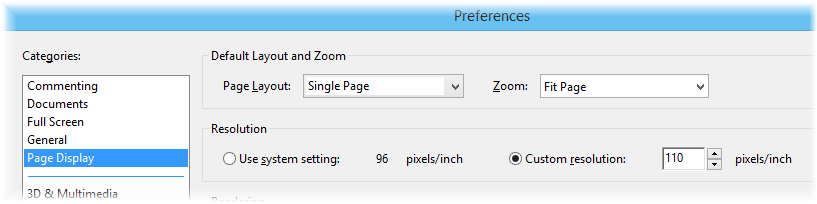
- With Page Display selected in the left hand list of Categories, on the right hand side of the window, choose a Page Layout and Zoom level that suits you, for example Single Page and Fit Page as shown here:

- Now any time you open a PDF, it will open at this zoom level.
Pewsheet for 26th April 2015
PewsheetsClick here to see this week’s pewsheet.
Tip: If this, or any other, PDF document opens at too large a size, here’s what you do:
- Open Adobe Reader, for example, by opening a *.pdf document you have on your computer.
- From the Edit menu, click Preferences.
- With Page Display selected in the left hand list of Categories, on the right hand side of the window, choose a Page Layout and Zoom level that suits you, for example Single Page and Fit Page as shown here:
- Now any time you open a PDF, it will open at this zoom level.
Pewsheet for 12th April 2015
PewsheetsClick here to see this week’s pewsheet.
Tip: If this, or any other, PDF document opens at too large a size, here’s what you do:
- Open Adobe Reader, for example, by opening a *.pdf document you have on your computer.
- From the Edit menu, click Preferences.
- With Page Display selected in the left hand list of Categories, on the right hand side of the window, choose a Page Layout and Zoom level that suits you, for example Single Page and Fit Page as shown here:
- Now any time you open a PDF, it will open at this zoom level.
Pewsheet for 5th April 2015 – EASTER SUNDAY
PewsheetsClick here for this week’s pewsheet.
Pewsheet for 29th March 2015 – Palm Sunday
PewsheetsClick here to see this week’s pewsheet.
Tip: If this, or any other, PDF document opens at too large a size, here’s what you do:
- Open Adobe Reader, for example, by opening a *.pdf document you have on your computer.
- From the Edit menu, click Preferences.
- With Page Display selected in the left hand list of Categories, on the right hand side of the window, choose a Page Layout and Zoom level that suits you, for example Single Page and Fit Page as shown here:
- Now any time you open a PDF, it will open at this zoom level.
Pewsheet for 22nd March 2015
PewsheetsClick here for this week’s pewsheet.
Pewsheet for 15th March 2015
PewsheetsClick here for this week’s pewsheet.
Tip: If the size of this, or any other PDF document opens at too large a size, here’s what you do:
- Open Adobe Reader, for example, by opening a *.pdf document you have on your computer.
- From the Edit menu, click Preferences.
- With Page Display selected in the left hand list of Categories, on the right hand side of the window, choose a Page Layout and Zoom level that suits you, for example Single Page and Fit Page as shown here:
- Now any time you open a PDF, it will open at this zoom level.
Pewsheet for 8th March 2015
PewsheetsClick here for the pewsheet for this week.
Pewsheet for 1st March 2015
PewsheetsClick here for the pewsheet for this week.
Tip: If the size of this, or any other PDF document appears too big to read, here’s what you do:
- Open Adobe Reader, for example, by opening a *.pdf document you have on your computer.
- From the Edit menu, click Preferences.
- With Page Display selected in the left hand list of Categories, on the right hand side of the window, choose a Page Layout and Zoom level that suits you, for example Single Page and Fit Page as shown here:
- Now any time you open a PDF, it will open at this zoom level.
 Worth Parish